Features

Everything You Need to Capture the Game

From instant screenshots to live scorecards and guest portals — ShotReceipt is the complete media and scoring platform for golf simulators.

Capture Every Moment

Screenshots, video clips, and camera angles — all triggered with a single hotkey.

Instant Screenshots

Capture your simulator screen with a single hotkey. Multi-monitor support means you get the full picture — scorecard, shot trace, and replay all at once.

Video Clips

ShotReceipt continuously records in the background. Press the hotkey after a great shot and save the last 30, 60, or 90 seconds — swing, reaction, and all.

Camera Recording

Add an IP camera or USB webcam to capture your swing alongside the simulator screen. Two angles, one clip — great for swing analysis or just capturing the celebration.

Scores & Live Scorecards

Track every round, celebrate every milestone, and display live scores on a second screen.

  • Score Uploads Scores are automatically captured and uploaded with each round. Every hole, every stroke — tracked and saved to the cloud.
  • Live Scorecard Display Open an independent, full-screen live scorecard on a separate monitor. Perfect for spectators in the lounge, a TV on the wall, or a second screen in the bay.
  • Special Shot Detection ShotReceipt automatically recognizes eagles, hole-in-ones, chip-ins, hole-outs, and even wrong-way shots. These moments are flagged and highlighted so they never go unnoticed.
  • Round History Every round is saved with full detail — course, date, players, and hole-by-hole scores. Guests and facility owners can look back at any time.
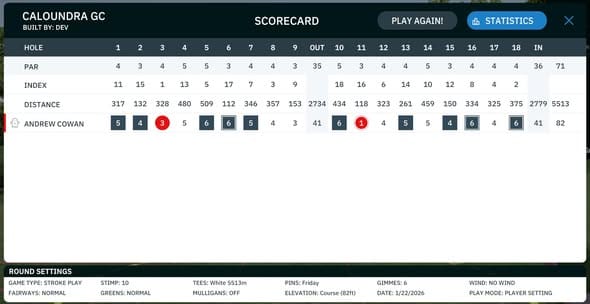
GSPro scorecard showing hole-by-hole scores and player stats

Share Instantly

Multiple ways to get captures into your players' hands — no accounts required.

Branded Emails

Send polished HTML emails with embedded screenshots, video links, course info, and your facility's logo. Players walk away with a keepsake of their session.

QR Code Sharing

Generate a QR code for any capture. Players scan with their phone and instantly have their shot on their device — no app download, no account needed.

Share Links

Every recording gets a unique share link. Send it via text, post it on social media, or embed it on your website. No login required to view — optional expiry for control.

QR Code Guest Check-In

Display a QR code at the bay for guests to self-register. They scan, enter their name and email, and they're linked to that bay's recordings for the session.

Guest Portal

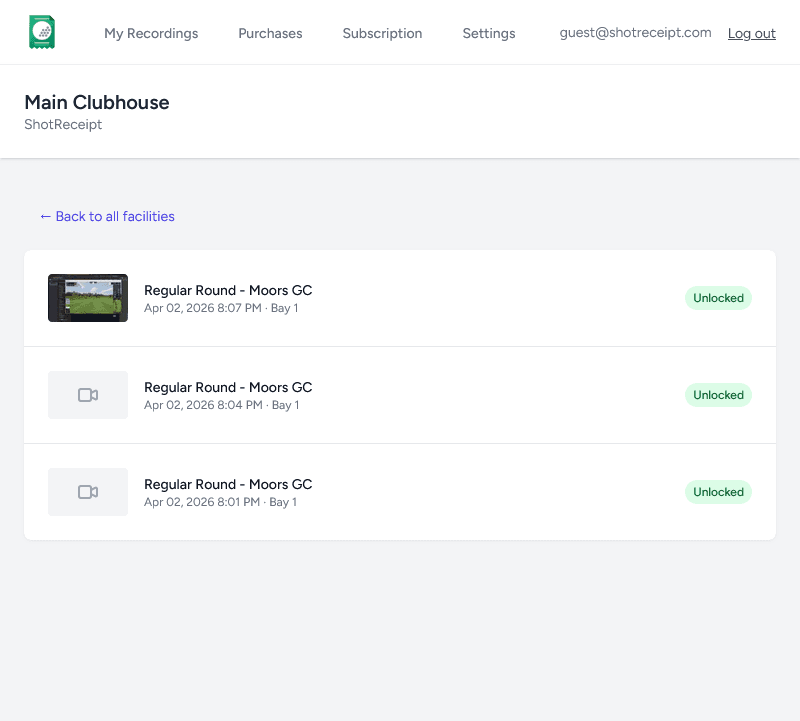
Every player gets their own dashboard — no app to install, just a magic link in their inbox.

  • Personal Dashboard Guests see all their recordings, rounds, and scores in one place. Filter by facility, date, or course.
  • Magic Link Access No passwords to remember. Guests click a link in their email and they're in. Simple, secure, and frictionless.
  • Account Merging Visited multiple facilities? Guests can merge accounts to consolidate all their recordings and rounds under one profile.
  • Download & Share Guests can download their videos and screenshots, or share them directly from the portal to social media.
ShotReceipt guest portal dashboard showing recording thumbnails, round history, and facility branding

Facility Dashboard

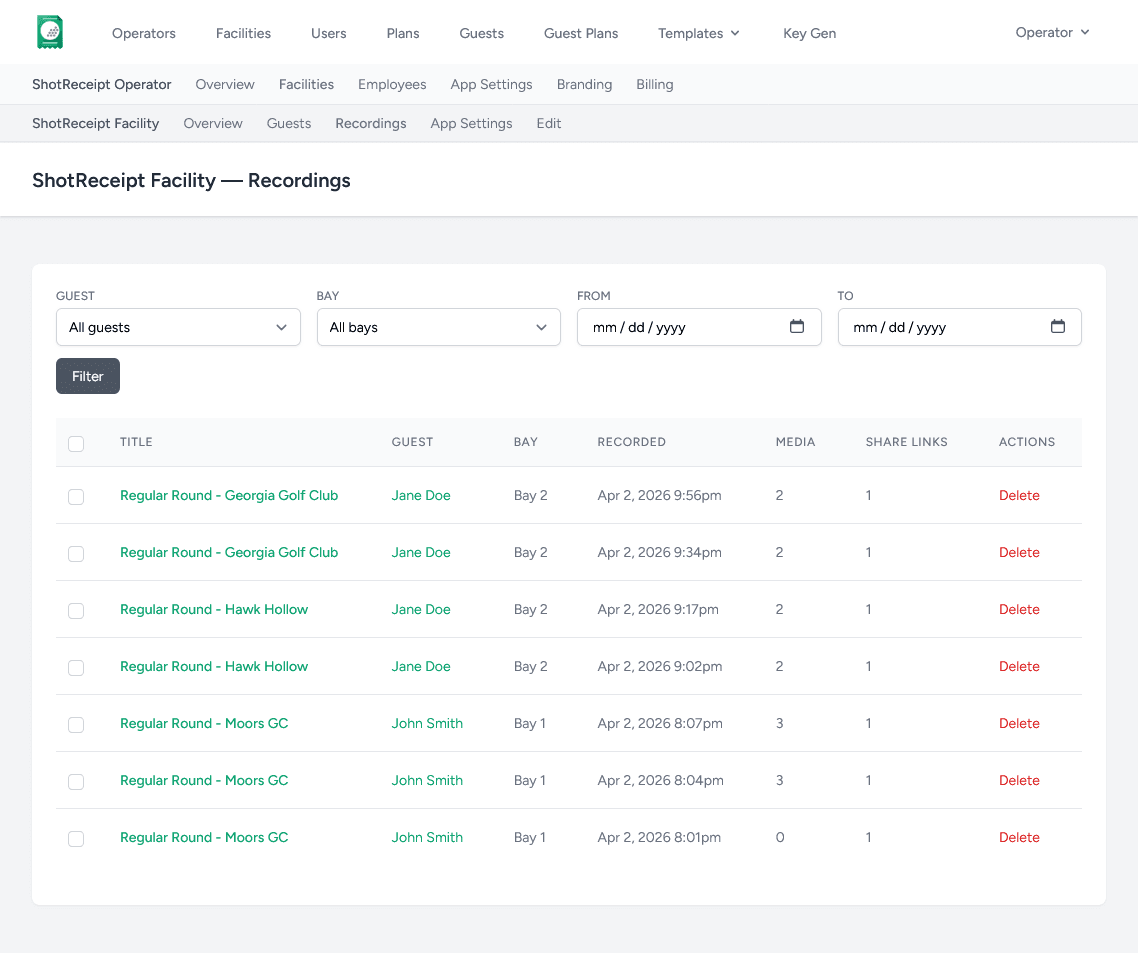
See every bay, every recording, and every guest — all from one management console.

  • Multi-Bay Overview See recordings from every bay in your facility at a glance. Filter by bay, date, guest, or recording type.
  • Guest Management View all guests who have visited your facility. See their recordings, rounds, and contact info. Grant complimentary access with a click.
  • Usage Tracking Monitor your plan usage — recordings, video minutes, storage, emails, and share links. Always know where you stand.
  • Multi-Facility Support Manage multiple locations from a single operator account. Each facility gets its own branding, settings, and billing — or pool them together.
ShotReceipt facility dashboard showing bay status cards, recent recordings, guest list, and usage meters

Your Brand, Everywhere

Every touchpoint carries your facility's identity — from emails to the guest portal.

Custom Logo & Colors

Upload your logo and set your accent colors. They appear on emails, share pages, the guest portal, and QR code landing pages.

Facility Information

Your company name, address, phone, and website appear on every communication. Guests always know who to contact.

Branding Inheritance

Set branding once at the operator level and it cascades to all your facilities. Override per-facility when needed.

Works With Your Setup

Designed for Windows PCs running any golf simulator software.

Any Simulator

GSPro, Full Swing, X-Golf, TruGolf, aboutGOLF, TrackMan, and more. If it runs on Windows, ShotReceipt works with it.

Multi-Monitor

Capture from any combination of screens. Choose which monitors to include in screenshots and which to use for the live scorecard.

IP & USB Cameras

Connect RTSP network cameras or USB webcams. Configure per-bay camera layouts with picture-in-picture or side-by-side views.

ShotReceipt

Ready to Get Started?

Download ShotReceipt and start capturing every moment today.

Windows 10/11 required. Free trial available.